_________________________________________________________
Start 9.00 a.m.
_________________________________________________________
Today i have been making the proper designs of the forms. I will add them all when i have finished them. The forms aren't in there exact design, this is too get a good idea of the user navigation and input. All of these forms are liable to ALOT of change!!!! Oh, and don't hassle the budgetness of them haha. The two forms i havent added in here are the home page and help page. This is because these will be determined when i get to impementation, at the moment they are not crucial to the input of the data, obviously.
Input Forms:
Job Forms
Client Forms
Map Forms
Users Forms
Previous Posts
5/4 Template Design pt. 5
2/4 Template Design pt. 4
1/4 Template Design pt. 3
1/4 Template Design pt. 2
1/4 Template Design pt. 1
_________________________________________________________
11.00 p.m. This is what i call dedication!!! /insane - 12.5 hours not inc. lunch + tea break
_________________________________________________________
Please excuse any (and most likely alot) mistakes i have made in these forms... my brain stopped working a while ago. Now i am going to ummmm stop. OR do some databasing!!!
Showing posts with label Interface Design. Show all posts
Showing posts with label Interface Design. Show all posts
Tuesday, April 8, 2008

7/4 Job Forms
_________________________________________________________
Job form flow diagram thingy
_________________________________________________________


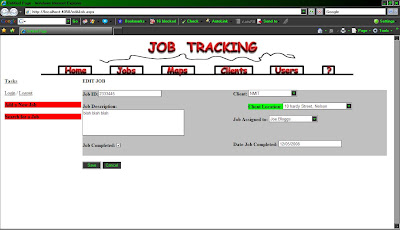

Job form flow diagram thingy
_________________________________________________________

_________________________________________________________
Forms
_________________________________________________________
Forms
_________________________________________________________
1. View jobs

2. Adding a job

5. Editing jobs

7. Search jobs

Previous Posts:
7/4 Client Forms
_________________________________________________________
Client form flow diagram thingy
_________________________________________________________


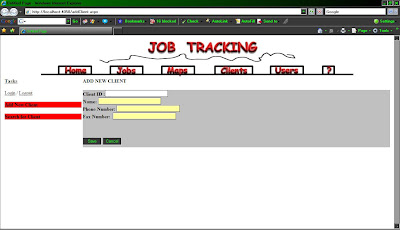

*The user can add in country (this field is missing here but is in the ERD and data dictionary) but keep in mind that they might try to map a route from two different countries :\ haha.

>Previous Posts:
7/4 Template Design pt. 6
5/4 Template Design pt. 5
2/4 Template Design pt. 4
1/4 Template Design pt. 3
1/4 Template Design pt. 2
1/4 Template Design pt. 1
Input Forms:
Job Forms
Map Forms
Users Forms
Client form flow diagram thingy
_________________________________________________________

_________________________________________________________
Forms
_________________________________________________________
Forms
_________________________________________________________
1. View clients

2. Add client

*Phone number and fax number are no longer on this form, they will be moved to the client addresses form.
5. Add client addresses

*The user can add in country (this field is missing here but is in the ERD and data dictionary) but keep in mind that they might try to map a route from two different countries :\ haha.
7. Search clients

>Previous Posts:
7/4 Template Design pt. 6
5/4 Template Design pt. 5
2/4 Template Design pt. 4
1/4 Template Design pt. 3
1/4 Template Design pt. 2
1/4 Template Design pt. 1
Input Forms:
Job Forms
Map Forms
Users Forms
7/4 Map Forms
_________________________________________________________
Map form flow diagram thingy
_________________________________________________________

I am leaving out the print form for now, as i'm tired, and ive never done the whole printing thing before and cbf figuring it out right now. Will have to leave it for a later date.
_________________________________________________________
Forms
_________________________________________________________
1. Choose jobs

2. Map

Previous Posts
5/4 Template Design pt. 5
2/4 Template Design pt. 4
1/4 Template Design pt. 3
1/4 Template Design pt. 2
1/4 Template Design pt. 1
Input Forms:
Job Forms
Client Forms
Users Forms
Map form flow diagram thingy
_________________________________________________________

I am leaving out the print form for now, as i'm tired, and ive never done the whole printing thing before and cbf figuring it out right now. Will have to leave it for a later date.
_________________________________________________________
Forms
_________________________________________________________
1. Choose jobs

2. Map

Previous Posts
5/4 Template Design pt. 5
2/4 Template Design pt. 4
1/4 Template Design pt. 3
1/4 Template Design pt. 2
1/4 Template Design pt. 1
Input Forms:
Job Forms
Client Forms
Users Forms
7/4 Users Forms
_________________________________________________________
User form flow diagram thingy
_________________________________________________________

_________________________________________________________
Forms
_________________________________________________________
1. Viewing users

2. Adding/editing users

3. Search users

Previous Posts
5/4 Template Design pt. 5
2/4 Template Design pt. 4
1/4 Template Design pt. 3
1/4 Template Design pt. 2
1/4 Template Design pt. 1
Input Forms:
Job Forms
Client Forms
Map Forms
User form flow diagram thingy
_________________________________________________________
_________________________________________________________
Forms
_________________________________________________________
1. Viewing users

2. Adding/editing users

3. Search users

Previous Posts
5/4 Template Design pt. 5
2/4 Template Design pt. 4
1/4 Template Design pt. 3
1/4 Template Design pt. 2
1/4 Template Design pt. 1
Input Forms:
Job Forms
Client Forms
Map Forms
Saturday, April 5, 2008
5/4 Template Design pt. 5
_________________________________________________________
Start 11.00 a.m.
_________________________________________________________
So i didnt do anything yesterday >< which is a good thing. I needed a day off lol. So today gonna do the form designs. I'm also at work, so have a few interuptions which is good, means i'm doing my job!!!!


_________________________________________________________
Finish ??
_________________________________________________________
Start 11.00 a.m.
_________________________________________________________
So i didnt do anything yesterday >< which is a good thing. I needed a day off lol. So today gonna do the form designs. I'm also at work, so have a few interuptions which is good, means i'm doing my job!!!!


_________________________________________________________
Finish ??
_________________________________________________________
Thursday, April 3, 2008
3/4 Blergh
_________________________________________________________
Start 9.00 a.m.
_________________________________________________________
This morning i am going to complete everything i need to do before this afternoon thats on my to do list. for thurs. I then have lunch, project meeting, then more homework before class, then class. So the next stage of design work wont be until after tea when i get home.
_________________________________________________________
Finish 11.00 a.m. 2 hours
_________________________________________________________
Start 9.00 a.m.
_________________________________________________________
This morning i am going to complete everything i need to do before this afternoon thats on my to do list. for thurs. I then have lunch, project meeting, then more homework before class, then class. So the next stage of design work wont be until after tea when i get home.
_________________________________________________________
Finish 11.00 a.m. 2 hours
_________________________________________________________
Wednesday, April 2, 2008
2/4 Template Design pt. 4
Cont. from 1/4 Template Design pt. 1
Cont. from 1/4 Template Design pt. 2
Cont. from 1/4 Template Design pt. 3
_________________________________________________________
Start 9.30 a.m.
_________________________________________________________
This morning i am going to work on project management stuff that is due tomorow. Later on during the day i will carry on with the design of the template.
_________________________________________________________
11.00 a.m.
_________________________________________________________
Pretty much finished that, just need break before i do the last question as it requires thinking and i am working slow today. Will move onto fun design stuff for a bit.
Below i am going to upload a list of random full page designs, including button ideas. The main links are not exactly what i am going to use at this stage, just something to work from.


************************************************************************
Break 12.00 p.m.
************************************************************************
_________________________________________________________
6.00 p.m.
_________________________________________________________
Carry on with designs.


Cont. from 1/4 Template Design pt. 2
Cont. from 1/4 Template Design pt. 3
_________________________________________________________
Start 9.30 a.m.
_________________________________________________________
This morning i am going to work on project management stuff that is due tomorow. Later on during the day i will carry on with the design of the template.
_________________________________________________________
11.00 a.m.
_________________________________________________________
Pretty much finished that, just need break before i do the last question as it requires thinking and i am working slow today. Will move onto fun design stuff for a bit.
Below i am going to upload a list of random full page designs, including button ideas. The main links are not exactly what i am going to use at this stage, just something to work from.


************************************************************************
Break 12.00 p.m.
************************************************************************
_________________________________________________________
6.00 p.m.
_________________________________________________________
Carry on with designs.


_________________________________________________________
Finish 10.00 p.m. - 4 hours
_________________________________________________________
Finish 10.00 p.m. - 4 hours
_________________________________________________________
Given up all pretence that more work has been done. I also need to make a decision for now which template i am going to use so i can move onto the more important design of the forms :) Will do this tomorow.
Tuesday, April 1, 2008
1/4 Template Design pt. 3
Cont. from 1/4 Template Design pt. 1
Cont. from 1/4 Template Design pt. 2
Cont. 2/4 Template Design pt. 4
_________________________________________________________
9.00 p.m.
_________________________________________________________


Cont. from 1/4 Template Design pt. 2
Cont. 2/4 Template Design pt. 4
_________________________________________________________
9.00 p.m.
_________________________________________________________
Headings and Fonts
Update. Ive been just in general trying to come up with ideas, so i started with fonts and backgrounds for the main heading. Below is what ive come up with so far.

Update. Ive been just in general trying to come up with ideas, so i started with fonts and backgrounds for the main heading. Below is what ive come up with so far.

OK, so below i am going to add lots of random ideas.... and discuss what i like about them, now dont hassle me because i'm trying to make pretty stuff and my brain isnt working atm, most likely some will be really wierd.
Idea One
Idea One
This is just a mix of a few of the designs above. Its pretty etc, but maybe not professional enough? Will see what else i come up with.

Ideas Two
More random stuff, i am just randomly doing anything now... lol. I really like the squiggly line for some reason, maybe because its sort of like a road.

Ideas Three
Thought i'd add more lines to the top. Not sure if i like it or not, too late to think now lol.
Ideas Four
Wow, i'm still going. Ummm i have no idea, just some more random fonts and colours.

_________________________________________________________
Finish 11.00 p.m. - 8 hours
_________________________________________________________
Finish 11.00 p.m. - 8 hours
_________________________________________________________
Hmm ive had enough, brain not functioning. Tomorow i will hopefully carry on with the random designs and settle on something that i want to work further from, this way i can start designing it with the whole page and get more of an idea of what it could look like.
GOOD NIGHT!
1/4 Template Design pt. 2
Cont. from 1/4 Template Design pt. 1
Cont. 1/4 Template Design pt. 3
Cont. 2/4 Template Design pt. 4
Other post was getting big. Here are a few layouts that i will consider, will be easier to know the exact layout before i start doing the proper design of template.
Layout One
This is a good layout, the only problem is that by having the main menu as well as a task bar next to eachother could leave very little room fo the the main content area. Mainly because the standard is to have your page around 800 pixels wide, vs having is very wide to add all of this in.

Layout Two
This one is my favourite, its logical and works well. However i'm not sure how users would react to having the tasks on the right hand side? This also brought up the issue of, when the user is selecting which jobs they want done, it doesnt seem to me, to make sense putting this on the right. Maybe i'm wierd... But my solution for that inparticular was to have a seperate form to let the user select the jobs.

Layout Three
Same as above except tasks are on the left.

Layout Four
Not sure about this one. The same as layout two, the only problem has to do with when theres a long list of jobs etc that you need to show. So for this one, it wouldnt be a good idea to make the tasks area a scroll down for jobs, so again it would have to be done in a seperate form. But if there are only small and simple tasks, this may not be too much of a bad idea, if the content wasnt pushed too far down the page.

OK, i am going to go with layout three. I feel more comfortable with the tasks being on the left side, and the main menu being on top, as this takes up the least amount of room.
_________________________________________________________
Class for project management - 4.00 p.m. - 6.00 p.m.
_________________________________________________________
************************************************************************
Tea 6.00 p.m. - 6.30 p.m.
************************************************************************
K, so tonight i need to do some project management... that assignment for thursday, and also figure out the stuff we did in class. Then i really want to get ahead with the template design. If i cant think of anything, i'll carry on with the layout of the forms and figure out everything i need for that.
Cont. 1/4 Template Design pt. 3
Cont. 2/4 Template Design pt. 4
Other post was getting big. Here are a few layouts that i will consider, will be easier to know the exact layout before i start doing the proper design of template.
Layout One
This is a good layout, the only problem is that by having the main menu as well as a task bar next to eachother could leave very little room fo the the main content area. Mainly because the standard is to have your page around 800 pixels wide, vs having is very wide to add all of this in.

Layout Two
This one is my favourite, its logical and works well. However i'm not sure how users would react to having the tasks on the right hand side? This also brought up the issue of, when the user is selecting which jobs they want done, it doesnt seem to me, to make sense putting this on the right. Maybe i'm wierd... But my solution for that inparticular was to have a seperate form to let the user select the jobs.

Layout Three
Same as above except tasks are on the left.

Layout Four
Not sure about this one. The same as layout two, the only problem has to do with when theres a long list of jobs etc that you need to show. So for this one, it wouldnt be a good idea to make the tasks area a scroll down for jobs, so again it would have to be done in a seperate form. But if there are only small and simple tasks, this may not be too much of a bad idea, if the content wasnt pushed too far down the page.

OK, i am going to go with layout three. I feel more comfortable with the tasks being on the left side, and the main menu being on top, as this takes up the least amount of room.
_________________________________________________________
Class for project management - 4.00 p.m. - 6.00 p.m.
_________________________________________________________
************************************************************************
Tea 6.00 p.m. - 6.30 p.m.
************************************************************************
K, so tonight i need to do some project management... that assignment for thursday, and also figure out the stuff we did in class. Then i really want to get ahead with the template design. If i cant think of anything, i'll carry on with the layout of the forms and figure out everything i need for that.
1/4 Template Design pt. 1
Cont. 1/4 Template Design pt. 2
Cont. 1/4 Template Design pt. 3
Cont. 2/4 Template Design pt. 4
_________________________________________________________
Start 9.00 a.m.
_________________________________________________________
Today now i know the basic tasks a user needs to perform, i will carry on with the template design. Spent time reading project management book and taking bus... stupid travel time.
_________________________________________________________
10.30 a.m.
_________________________________________________________
OK finally get on with proper work. Did a bit of design... then thought hmmm should start on that assignment due on thursday that i havent looked at :\
************************************************************************
Lunch 12.00 p.m. - 1.00 p.m.
************************************************************************

Just a messy version of brainstorming tasks needed to do. Also a small diagram, me starting the database already haha, but it shows the data that i think will be needed at this stage.

This is the basic template layout. Just the main title at the top of the page which never changes. The main menu down the side which never changes. Next to the main menu is another menu that has options for the particular part of the application the user has navigated to. In the middle is where the main content will go. I think i will have to design more than one layout though, keeping in mind the size limits of users screens.


This is a better re-done version of above.


Cont. 1/4 Template Design pt. 3
Cont. 2/4 Template Design pt. 4
_________________________________________________________
Start 9.00 a.m.
_________________________________________________________
Today now i know the basic tasks a user needs to perform, i will carry on with the template design. Spent time reading project management book and taking bus... stupid travel time.
_________________________________________________________
10.30 a.m.
_________________________________________________________
OK finally get on with proper work. Did a bit of design... then thought hmmm should start on that assignment due on thursday that i havent looked at :\
************************************************************************
Lunch 12.00 p.m. - 1.00 p.m.
************************************************************************
I has moved back onto design, and went and scanned (painfully slowly) some of whats in my note book thingy.
Below is a drawing i did right at the start of the research stage, just to get a bigger picture of what i was going to do. Basically its showing that the user needs a list of jobs and these will be mapped out. The layout of this gives you an idea of what i want to do.

Just a messy version of brainstorming tasks needed to do. Also a small diagram, me starting the database already haha, but it shows the data that i think will be needed at this stage.

This is the basic template layout. Just the main title at the top of the page which never changes. The main menu down the side which never changes. Next to the main menu is another menu that has options for the particular part of the application the user has navigated to. In the middle is where the main content will go. I think i will have to design more than one layout though, keeping in mind the size limits of users screens.

While i was getting an idea of the tasks the users need to perform, i thought it would be good to create what they might look like. This way i can see easily what the users may do. This particular one is for jobs. In the side menu for jobs is the option to sort the jobs, and an option to add.

This is a better re-done version of above.

This is basically the same as the first picture, except messier... haha. This one has the directions at the bottom of the page, and the option to print as well as choose the starting position as home. I will have to think about how the user will input another starting location... this most likely will change from being a tick box, to a more complex menu.

Monday, March 31, 2008
31/3 Design
_________________________________________________________
Start 9.00 a.m.
_________________________________________________________
OK, so my main objective today is to figure out what tasks i need to do for the design, and how long these might take. Also this morning i put together a time table so i can improve my time management, or at least try to. :D
Below is what i specified in my milestones.
18th April - Design Goals
Break 3.30 p.m. - 5.30 p.m.
************************************************************************
Start 9.00 a.m.
_________________________________________________________
OK, so my main objective today is to figure out what tasks i need to do for the design, and how long these might take. Also this morning i put together a time table so i can improve my time management, or at least try to. :D
Below is what i specified in my milestones.
18th April - Design Goals
- Interface design (Template for website, Form for mapping and jobs, Print out design, Other appropriate form designs)
- UML diagram (Basic)
- Database (Conceptual design, Logical design, Physical design)
Break down of tasks
I am going to do the design stage the best way that is easy for me. This is why i am going to sort of mix up the interface design with the database design, and based on this i will come up with the classes i need for the UML diagrams and work from there. This is mainly because i think in database sort of terms, with entities, attributes and relationships, as this makes it easier for me to see the whole picture.
Interface (7 days)
- Come up with a list of tasks the users will need to acomplish by using this system. This way i can get a better idea of what the user needs to do, and what data they need to input/use.
- Make a list of data needed (most likely start the database design cause i'm naughty!).
- Design the template layout. I will need to come up with some pretty but practical look for the site.
- Figure out, based on the data etc needed, what forms i will need for input and output.
- Make the designs on the computer, so i have a more procise design to upload/show people.
Database (2 days)
- Create entities, attributes, relationships, primary keys (PK) and foreign keys (FK).
- Produce a logical entity relationship diagram (ERD).
- Produce a data dictionary.
- Produce a physical diagram with all of the data types.
- Have these diagrams in visio.
UML (Unified Modelling Language) (6 days)
- Create a basic starting design with entities, attributes and relationships.
- Based on what i came up with in the design of the forms, make a list of functionality that the program will need to perform.
- Make a list of all the functionality and prioritise all of these. This way if i get behind i will only implement the most important functionality.
- Once i have an idea of the whole program, i will produce the final UML diagram.
************************************************************************
Break 11.30 a.m. - 12.00 p.m.
************************************************************************
My plan for the rest of the day is to start the list of tasks needed to perform in the system. If i get this done i will move onto the template design.
Tasks - so far
Users
- Add
- Edit
- Delete
- View - list of jobs
- Assign jobs
- Assign permissions
Clients
- Add - one or more locations
- Edit
- Delete
- View
- View location on map
Jobs
- Add
- Edit
- Delete
- Assign job to user
- View
- Sort view
- Assign the job as completed
Maps
- Choose which jobs will be mapped out, add prioritys if needed.
- Get directions once jobs are selected/prioritised.
- View directions.
- Print directions. (Select what to print).
Data needed
Below is the basic un-normalised data that i need. Information about the staff or users of the system, the jobs that need to be done and the clients information.
Staff ID of some type
User name, first & last
Password?
Job #
Job description
Job completed
Client #
Client name
Client phone number
Location Address
Location geocode
Break 3.30 p.m. - 5.30 p.m.
************************************************************************
Carry on with design on paper.
_________________________________________________________
Finish 8.00 p.m. - 8 hours.
_________________________________________________________
Subscribe to:
Posts (Atom)
